This article contains affiliate links.
Yes, Elementor is still worth it in 2026 for a business website that has to last several years, especially if its owners want to edit it themselves. AI has slashed the cost of building a website. It has not solved what comes next: changing a price on a Tuesday morning, handing an update over to a colleague, moving the site to another provider. On all three counts, a visual editor running on WordPress keeps a clear advantage, all the more so now that Elementor can take in work done by agents such as Claude Code or Codex.
The answer is different for a short-lived page or a custom application. On speed, Elementor asks for discipline and rewards it: built the right way, an Elementor site can perform very well. When a WordPress site is slow, the cause usually lies less in the editor than in the plugins piled up around it. Learning to use Elementor properly means realising you rarely need anything else. And when a specific need does call for a plugin, choose it for its usefulness, its performance and its security, because every extra plugin adds a potential vulnerability.
The rest of this article looks at what version 4 really brings, and at the right choice depending on whether you run a business, work as a freelancer or manage an agency.
What can AI really do to build a website in 2026?
In 2026, “building a website with AI” covers four very different things. What you get is not the same, and neither is the person able to change it afterwards.
| Type of tool | Examples | What you get | Who can edit it afterwards |
|---|---|---|---|
| Hosted builders | Wix Harmony, Hostinger, Durable | A complete website, hosted by the platform | You, in the platform’s editor |
| Generated apps | Lovable | An application in code, created through conversation | You, through prompts paid in credits, or a technical person |
| Coding agents | Claude Code, Codex, Cursor | Custom code, in the technology of your choice | A technical person, alone or with an agent |
| Agents inside WordPress | Angie, Elementor MCP | Standard Elementor pages | You, with the mouse, in the visual editor |
To test an idea, pitch a project or get a first mock-up, AI has won: a few minutes now do the work of several days. A mock-up that stands out still takes skill, though. Only someone from the trade, a designer or a developer with a designer’s eye, will produce something relevant and different from the mock-ups anyone can get in a few clicks with the same tools. The comparison becomes interesting when that first version has to turn into a working tool for a business.
The real question: who will edit your website in eighteen months?
A business website is not finished on launch day. A roofer adds her latest jobs, a restaurant changes its menu, a firm welcomes a new partner. For a tradesperson, a small business owner or a manager in a growing company, the website has to support the business without becoming a second job. The right way to choose comes down to one simple test: on a Tuesday morning, between two appointments, what happens when a piece of information needs to change?
| The Tuesday morning test | Elementor on WordPress | Hosted builder | AI-coded website |
|---|---|---|---|
| Change a text or a photo | Right on the page, with the mouse | In the platform’s editor | With a prompt to the AI, or through a technical person |
| Avoid breaking the layout | Restricted roles and locked Components (Pro) | Depends on the platform | An admin interface has to be built |
| Switch providers | Any WordPress professional can take over | Access to the account is enough | Someone first has to understand one-off code |
| Switch hosts | Freely | Not possible with Wix, the site stays on its servers | Possible, with technical skills |
| When something breaks | Backups, a large community, plenty of providers | The platform’s support team | Whoever, or whichever agent, knows that code |
This table explains why Elementor keeps a place that the builders have not taken. A visual editor turns running a website into actions everyone understands: click on a heading, rewrite it, swap an image, save.
I often compare Elementor to Lego when I talk to clients. It is remarkably easy to pick up, whatever your age. AI replaces neither guidance nor people, and Elementor remains an excellent tool for handing a business real control over its website.
Themis, WordPress developer
An AI produces a page. It does not sit for an hour next to a business owner to show her where to change her opening hours, and it will not suggest dropping a service that no longer brings anyone in. Handing over a website is still human work, and the choice of tool decides how easy it is.
Elementor V4: what changes for the people who manage their website?
Elementor 4.0, released in spring 2026, is the biggest change to the editor after more than five years on version 3. Most guides cover this new editor, called Atomic, from a technical angle. Yet its most useful contribution is for end clients: Components.
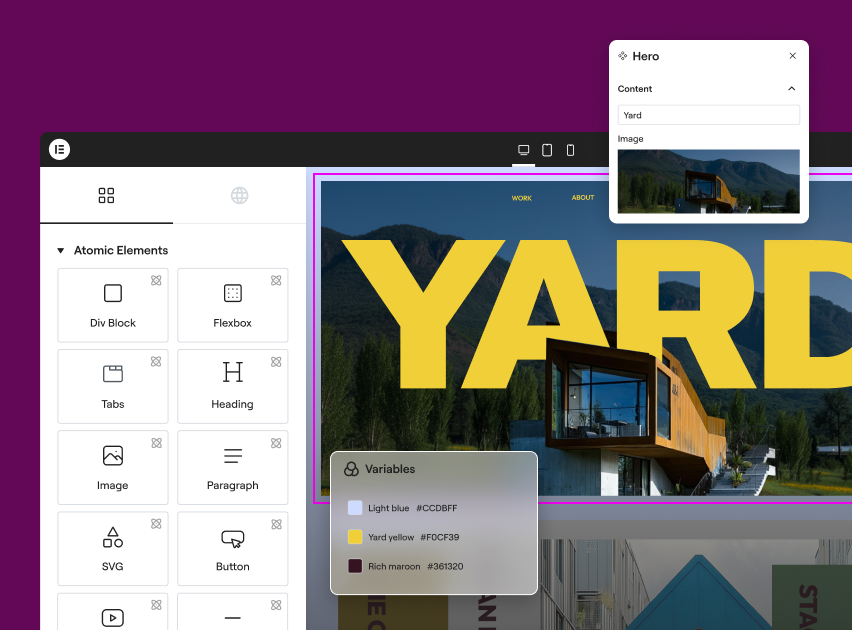
An Elementor Component is a block designed once, then reused across the whole site. Whoever administers the site decides which content stays editable: a text, an image, a link. The layout stays protected and updates everywhere as soon as the template changes. A business can add a new project or a team profile without any risk of distorting the page. Creating a Component requires Elementor Pro, an administrator account and the new Atomic elements.
Elementor Pro’s Role Manager completes the setup with its “access to edit content only” option: the user opens the editor, edits what is already there and cannot add new elements. The Elementor Pro changelog has reported imperfect behaviour on this setting in the past, so test it before handing over a site.
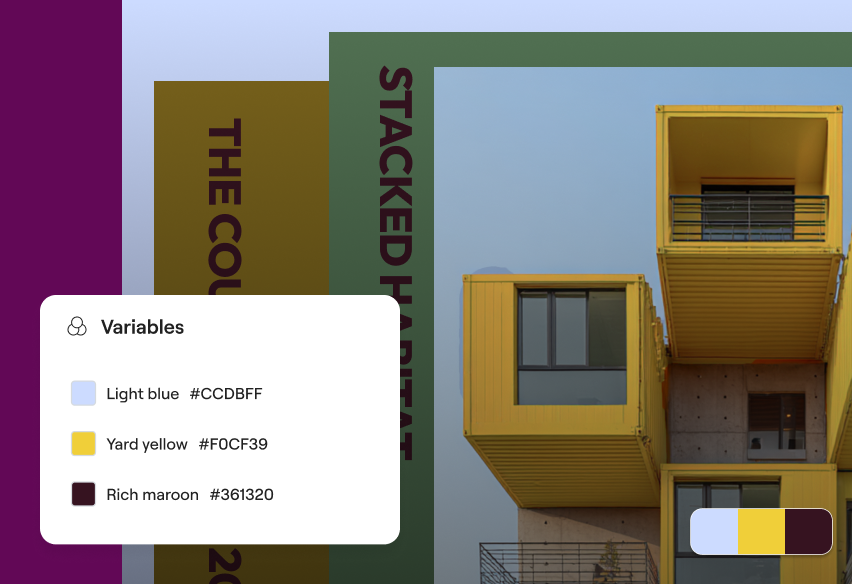
V4 Variables and Classes follow the logic of stylesheets: a colour, a font or a spacing value is defined once and applied everywhere. A brand refresh, which used to mean going through pages one by one, becomes a single change. These settings can also be exported from one site to another, which is good news for agencies.
Moving to V4 is not compulsory. According to Elementor, existing sites stay unchanged after the update, new features are switched on manually, and V3 and V4 elements can sit side by side on the same page. Version 4.3.6 of 2 November 2026 is still not a finished product, though: the public roadmap lists an Atomic list and carousel for November 2026, then an Atomic mega menu in early 2027. For a new site, V4 makes sense if the elements you need already exist. A V3 site that works can stay as it is.
Elementor and AI: what is the difference between Elementor AI, Angie and the MCP?
Elementor is not fighting AI. It has built it in at three levels that comparisons often mix up.
| Tool | Role | Access | Good to know |
|---|---|---|---|
| Elementor AI | Assistant inside the editor: text, images, code | Depends on the plan, with credits | Handy for one-off edits |
| Angie | Agent installed in WordPress that generates pages, widgets and code | Free plugin, daily credits | Over 100,000 installs, rated 3.3/5 from 20 reviews on WordPress.org as of 8 November 2026, with complaints about credits |
| Elementor MCP | Connects an external agent to the site: Claude Code, Claude Desktop, Codex, Cursor | Free connection, Pro subscription for Pro features | Since version 4.3.0 in September 2026, WordPress 6.8 minimum, administrator accounts only |
Elementor MCP is the most important development of the year. MCP (Model Context Protocol) is a protocol that lets an AI take action inside a piece of software. Connected to Elementor, an agent creates pages, manages colours and classes, and builds headers and footers. What it produces is not opaque code: these are ordinary Elementor pages, saved as drafts, that a non-technical person can then edit with the mouse.
The “AI or visual editor” debate loses much of its meaning, since both now work on the same site:
- The agent receives the brief, the mock-ups and the site’s context, then prepares the pages as drafts.
- The professional checks the rendering, the hierarchy, accessibility and mobile display, then fine-tunes by hand.
- The business receives a website it can edit without going through an AI.
Elementor has also announced an “Agent Ready” feature to make sites readable by AI agents, and “MCP Skills” for early 2027.
How do you get a fast Elementor website?
Elementor promises cleaner code and fewer nested containers for its Atomic elements. The real effect will show as more sites are built on V4.
In the meantime, method matters more than version:
- Choose hosting with server-side caching, because server response time weighs heavily on speed. The lightweight Hello Elementor theme is not enough on its own.
- Keep only the plugins that do a specific job, and no more than one widget pack, ideally none.
- Compress images before uploading them and save animations for the places where they help people read.
- Test every page template on mobile before launch, then again after every significant addition.
Over the years, Elementor has improved in its code, its architecture and the weight of its pages. Today you can build a fast website, as long as you use the editor properly and stick to the plugins you really need. I have always worked this minimalist way.
Themis, WordPress developer
Is an AI-built website riskier than a WordPress site?
Neither option is safe by nature. The study Understanding the (In)Security of Vibe-Coded Applications, published in 2026, audited 200 deployed applications built with Claude Code or Lovable: 91% contained at least one vulnerability, and 65.77% of the 1,186 flaws found were rated critical or high. Veracode, for its part, measured security flaws in 45% of the test cases it gave to more than 100 AI models in 2025.
WordPress has weak spots too. Patchstack recorded 11,334 new vulnerabilities in its ecosystem in 2025, 91% of them in plugins and 9% in themes, against only 6 in WordPress core, all of them low priority. The most targeted flaws are mass-exploited within 5 hours, as a weighted median.
The difference lies in how the response is organised. A flaw in a well-known WordPress plugin usually ends up with a public patch, rolled out through a simple update, even though 46% of the vulnerabilities recorded by Patchstack had no fix yet when they were disclosed. A flaw in code generated for your business alone interests nobody else: someone first has to find it, then fix it. On a WordPress site, minimalism is therefore a security measure as well. Every plugin you remove makes pages lighter and shrinks the attack surface, provided updates and regular backups are taken care of.
Who is Elementor still the right choice for in 2026?
Tradespeople and small businesses
For a business whose trade has nothing to do with the web, Elementor makes sense when the site is built by a professional who then hands over the controls. This approach brings a solid website, restricted access to content and a short training session, usually enough to handle everyday changes on your own. Building it yourself with an AI looks cheaper, until the day you need to work out why quote requests have stopped coming in.
Growing companies and in-house teams
In a larger company, several people work on the website: marketing, management, HR. Components and roles let you share the work without exposing the brand guidelines. The point to settle from day one is governance: who publishes, who approves, who holds the access, who handles updates.
Freelancers
The MCP changes the economics of the job. Assembly time goes down, and part of the value shifts towards advice, content, SEO and support. Freelancers who mainly sold page building will be the most exposed. Those who make a business independent on its own website have, on the contrary, an argument that the builders lack.
Agencies
For an agency, V4 answers a need to scale production: an exportable design system, reusable Components, and a V3 portfolio that can stay as it is. Paired with a tool like Crocoblock for dynamic content, it covers a large share of brochure websites. The MCP, which saves drafts and connects site by site, fits into an existing approval process.
What a business should insist on when its website is handed over
Dependence on a provider is decided on handover day, whatever tool was used. Before you pay the final invoice, check the following:
- The domain name and hosting are in your name, or you can get them back with no strings attached.
- You have an administrator account as well as your editing account.
- You know who owns the Elementor Pro licence and what happens when it renews.
- Backups are automatic, stored off the server, and a restore has already been tested.
- Someone is named as responsible for updates, with a contract or a written routine.
- You know how to change a text, a photo and a project yourself, ideally after a short recorded training session.
- The contact form has been tested, and messages arrive in an inbox you actually read.
What should you know before committing to Elementor?
Elementor Pro works on a subscription, from $60 a year for one website, €60 in the eurozone and £48 in the UK, before tax, according to the prices shown on elementor.com on 11 November 2026. According to the official FAQ, a site whose subscription has ended stays online and keeps its content. Renewing keeps the Pro features, updates, security fixes and access to form submissions: it is a line to plan for in the site’s annual budget.
Your content belongs to you and you can change hosts freely. Since the layout is built with Elementor, switching to another editor means rebuilding how the pages look, as with any page builder. The AI features run on credits, to be budgeted according to use, and the transition period between V3 and V4 means knowing both ways of working.
When should you choose Elementor?
- Your website has to last several years and your team wants to change a text, a photo or a project itself, right on the page.
- You want to keep ownership of your website, choose your host and be able to hand it over to any WordPress professional.
- Several people work on the site and the brand guidelines must stay intact: Components and roles share out the work without exposing the layout.
- You want to benefit from AI without depending on it: with Elementor MCP, an agent prepares pages that you then edit with the mouse.
- You build websites for clients: Variables, Classes and Components can be reused from one project to the next.
Frequently asked questions about Elementor and AI
Will AI kill Elementor?
Nothing points that way in the short term. As of 8 November 2026, W3Techs finds Elementor on 12.4% of all websites and 18.3% of websites whose CMS is known. The editor has also chosen to open up to AI agents with its MCP, which changes its role: it becomes the interface where work done by an AI stays editable by a person.
Can Claude Code edit an existing Elementor website?
Yes, through Elementor MCP, available since version 4.3.0, with WordPress 6.8 or later. The connection is switched on from the Elementor menu in the dashboard, an administrator account is required, and generated content is saved as drafts. A human review is still essential before anything goes live.
Should you migrate your Elementor site to V4?
No, no migration is required. Elementor states that existing sites do not change after the update and that V3 and V4 elements can coexist. V4 is worth considering for a new site or a major new section.
Is Elementor bad for SEO?
No, Elementor does not penalise a site in itself. As with any website, speed matters: fast hosting, few plugins, light images and a sound heading structure give an Elementor site a good foundation for search rankings.
Is the free version of Elementor enough for a small business?
The free version is enough for simple pages. The Theme Builder, forms, Components and restricted roles require Elementor Pro, and they happen to be exactly the features you need to hand a website over to a business.
How do you decide for your own website?
Ask yourself a single question: who will look after the site once the build is finished? If the answer is your team, with or without a professional at its side, Elementor is still one of the easiest tools to hand over in 2026, provided it is built with restraint. AI can take on much of the assembly. The website itself should stay in your hands.
Lien affilié, pour soutenir le travail de nos rédacteurs.